"Transaction was deadlocked and has been chosen as the deadlock victim." — sounds familiar?
That vague message tells you nothing. Which transaction? Waiting on what? Why now and not yesterday?
When I first experienced the situation, after some hours of blind debugging and a complete service restart, I learned that deadlocks aren't mysterious database gremlins. Instead, they're reproducible patterns that follow the classic Coffman conditions with depressing consistency.
A database deadlock occurs when two or more transactions become stuck waiting for each other to release resources, creating a standstill in which no transactions can proceed. They're not random.
Over the past years, here’s what I've learned: you need more than vague awareness that deadlocks "happen sometimes." You need to recognize patterns, capture evidence quickly, and turn that into actual prevention.
The sections ahead cover the five deadlock archetypes I've seen most often in production systems — the ones that wake you up, cost you money, and can make you question your career choices.
Each pattern includes detection techniques that surface the problem fast with proven fixes that prevent recurrence. These are the patterns that have cost me sleep, taught me hard lessons, and eventually made me better at building systems that stay online.
1. Conflicting row locks with reversed access order
This is the textbook deadlock, the one they teach in databases 101, and somehow still the one I see most often in production. Two sessions grab the same resources in opposite order. Session one locks row X, then attempts to reach row Y.
Session two does the reverse — grabs row Y first, then needs row X. Neither releases what it has while waiting for what it wants, and boom: circular wait, system frozen.
I've debugged this pattern many times. The worst instance involved a checkout flow where one code path processed shopping cart items by cart_id in ascending order, while another path (added by a different team months later) processed them by user_id in descending order.
Everything worked fine until we encountered a specific traffic pattern in which two users with adjacent IDs checked out simultaneously, resulting in overlapping cart items. Deadlock. Every. Single. Time.
SQL Server's xml_deadlock_report shows this cycle beautifully through Extended Events or trace flag 1222. The lock monitor scans the wait-for graph every 5 seconds by default, dropping to as low as 100 milliseconds after detecting recent deadlocks.
It picks the lowest-cost victim to break the cycle. That XML report becomes your roadmap. It tells you exactly which two transactions locked which resources in which order.
PostgreSQL reveals the same pattern when you query pg_locks and cross-check PIDs from pg_blocking_pids(). The output is less polished than SQL Server's XML, but it gets you the same information: who's waiting on whom, and for what.
The triage fix
If you're fighting this live, you can bias the selection of victims toward less critical work. Got a batch job deadlocking with user-facing queries? Lower its priority:
SET DEADLOCK_PRIORITY LOW;
That single line tells SQL Server: "If you need to pick a victim, pick me." Your batch job takes the hit, users stay happy, and the incident is resolved. It's a band-aid, but when revenue is bleeding, band-aids matter.
The permanent fix
The real solution is embarrassingly simple in theory, painful in practice: lock resources in the same order across all code paths. Every transaction that touches orders and order_items must acquire locks in the same sequence — say, always order by primary key ascending.
No exceptions. No "but this query is faster if we sort differently," no "that code is legacy, and we can't touch it."
I've made this fix across different codebases, and the pattern is always the same: find every query that touches the contended tables, audit the locking order, standardize on a single ordering convention (usually primary key ascending), and commit quickly to minimize lock duration.
Once every code path respects that universal ordering, the circular wait physically cannot form. The deadlock just... stops happening.
The hardest part is getting different teams to coordinate on a locking strategy when they all own different parts of the codebase. Schedule a war room, get everyone in the same Zoom, share the deadlock graph, and don't leave until you have a consensus.
Document the locking order in your wiki, with all-caps warnings that it must be followed. Make it a code review checklist item. This is the kind of thing that seems obvious until you're debugging it at 2 AM for the third time in a month.
2. Lock escalation from rows to table level (the invisible upgrade)
This one drove me crazy for days before I understood what was happening. We had batch jobs that updated about 2,000 rows at a time — small enough to be safe, or so we thought. Transactions were scoped correctly, indexes were in place, and locking order was consistent.
Everything should have worked. Yet we'd randomly see deadlocks between jobs that should never have conflicted.
The culprit? Lock escalation. The database engine was making a "helpful" optimization behind our backs, promoting thousands of row locks to a single table lock to save memory. That automatic promotion turned our carefully isolated transactions into system-wide bottlenecks.
Here's how it works: SQL Server checks for escalation every 1,250 locks acquired and attempts escalation when a statement holds at least 5,000 locks on a single table reference. The engine tracks every row or page lock in memory, and at some point, it decides "this is too expensive" and swaps them all for a single OBJECT lock.
Makes sense from a resource perspective.
Absolute disaster from a concurrency perspective.
The escalation happens instantly and without warning. One millisecond, you have granular row locks that don't conflict with other transactions. The next millisecond, you have a table lock that blocks everything.
If another transaction already holds row locks in that same table, each waits for the other's resource — a circular wait, a deadlock victim is chosen, or the transaction is rolled back.
Spotting the pattern
You can catch this by streaming the LOCK_ESCALATION Extended Event or querying sys.dm_tran_locks during an incident. Look for a sudden burst of OBJECT locks where you expected KEY or PAGE locks.
If you see hundreds of row locks disappear and be replaced by a single table lock, escalation has just triggered.
The frustrating part is that the escalation algorithm uses historical data about your queries. It might escalate one batch but not another identical batch five minutes later. It might escalate during peak traffic, but never during testing.
This inconsistency makes it nearly impossible to reproduce in staging, which is why so many teams only discover the problem in production.
The emergency response
During firefighting, you can suppress escalation with trace flag 1224 or tweak the escalation threshold. Trace flag 1211 turns off escalation entirely (dangerous—can exhaust memory), while 1224 prevents it until you hit a memory pressure threshold. Use 1224 in production unless you have a very good reason not to.
You can also turn off escalation per table:
ALTER TABLE orders SET (LOCK_ESCALATION = DISABLE);
This tells SQL Server, "never escalate locks on this table, even if it costs memory."
I've used this approach when we had a single critical table that could not tolerate table locks during business hours. It worked, but monitor your lock memory consumption because you're now storing all those row locks permanently.
The long-term architecture fix
Band-aids keep you alive, but they don't prevent the following incident.
The real solution has three parts:
- Batch your updates smaller (never let one statement touch 5,000+ rows)
- Add covering indexes so queries touch fewer pages (reducing lock count)
- Hint explicit ROWLOCK/PAGLOCK to keep locking granular
I've found that batching is usually the winner.
Instead of one UPDATE statement affecting 10,000 rows, break it into 20 statements of 500 rows each, with a slight delay between batches. Yes, it takes longer. Yes, it's more complex code. But it never triggers escalation, never deadlocks, and never wakes you up at 3 AM. That's worth the extra five lines of code.
The other benefit of batching: when you do get a deadlock (and you will, eventually), you lose 500 rows of work instead of 10,000. Your retry logic completes faster, users notice less impact, and your incident postmortem is shorter.
Small batches fail gracefully. Large batches fail catastrophically.
3. Long-running shared locks from unindexed reads (the silent scan)
Here's an embarrassing admission: I once brought down an entire platform with a SELECT statement. Not a complex analytical query. Not a massive JOIN. Just SELECT * FROM products WHERE category_id = 5.
That innocent query locked 40,000 rows for eight seconds, blocked every checkout attempt, and cost some lost revenue before someone killed my session.
The problem? No index on category_id. The database engine had to scan the entire products table, holding shared locks (S-locks) on every single row it examined. Those locks persisted throughout the scan duration.
Meanwhile, checkouts needed exclusive locks (X-locks) to update inventory quantities. S-lock meets X-lock requirement, circular wait forms, deadlock detector picks victims, and suddenly customers can't buy anything.
What makes this pattern especially nasty is that it often works fine in development. Your dev database has 500 products. The scan takes 12 milliseconds. No locks held long enough to matter.
Then, you deploy to production with 2 million products, and suddenly that same query holds locks for 10+ seconds. The deadlock appears "randomly" because it only triggers when the scan overlaps with a write operation, which happens way more often as traffic scales.
Finding the culprit
You can spot this by examining the deadlock graph for S versus X lock conflicts. SQL Server captures these through Extended Events — look for processes holding S-locks on a large number of keys while waiting for X-locks.
Cross-reference the blocked statement with sys.dm_db_missing_index_details. If the database has been screaming at you to add an index and you've been ignoring it, this is why.
PostgreSQL users can also run EXPLAIN ANALYZE to identify full-table or range scans. Look for "Seq Scan" in the output with a large "rows" count. That's your smoking gun. The query is touching way more rows than it needs to, and it's locking all of them.
Missing indexes are probably the most common source of database performance problems I see, and they contribute significantly to blocking scenarios that escalate into deadlocks. The thing is, a missing index doesn't always cause a deadlock.
It just creates conditions that make deadlocks more likely. Add traffic, add concurrency, add a slow network, and suddenly your unindexed query goes from "slightly slow" to "production is down."
The immediate fix
Add the missing index right now. Not tomorrow. Not next sprint. Now.
Converting table scans into index seeks completely changes the locking behavior. Instead of holding S-locks on thousands of rows for seconds, you acquire and release locks row-by-row in microseconds:
CREATE INDEX idx_products_category
ON products(category_id)
INCLUDE (name, price, inventory);  -- Cover frequently selected columns
I've watched this single change drop deadlock frequency a lot. The query goes from scanning 2 million rows to seeking 40 rows. Lock duration drops from 8 seconds to 12 milliseconds. Problem solved.
But don't stop there. Audit your other queries for similar patterns. If one query has this problem, others probably do too.
I usually run a DMV query to find the top 10 most expensive operations and check each one for missing indexes:
SELECT TOP 10
    qs.execution_count,
    qs.total_elapsed_time / qs.execution_count AS avg_elapsed_time,
    qt.text,
    qp.query_plan
FROM sys.dm_exec_query_stats qs
CROSS APPLY sys.dm_exec_sql_text(qs.sql_handle) qt
CROSS APPLY sys.dm_exec_query_plan(qs.plan_handle) qp
ORDER BY qs.total_elapsed_time DESC;
Fix the worst offenders first. You'll probably prevent five other deadlock patterns before they manifest.
The architectural fix
Beyond indexing, limit your read sets with pagination (TOP/LIMIT clauses) so even an accidental full scan can't lock the entire table. Consider row-versioning isolation, like Read Committed Snapshot Isolation or Snapshot Isolation, to replace S-locks with version snapshots.
I've deployed RCSI at two projects specifically to eliminate read-write contention. It has tradeoffs; you use more tempdb, you might see slightly stale data, and you need to tune your queries for the new isolation level.
But the benefit is massive: readers never block writers, and writers never block readers. The entire class of S-lock vs X-lock deadlocks just disappears.
The catch? You need to test this thoroughly. RCSI changes locking behavior across your entire database, which means every query behaves slightly differently. I usually enable it in staging first, run load tests for a week, monitor for anomalies, then schedule a maintenance window for production. It's not a quick fix, but it's worth it for high-concurrency workloads.
4. Cascading foreign-key actions and trigger chains (the hidden cascade)
I once spent four hours debugging a deadlock that made no sense. The application was deleting one row from one table. Simple DELETE FROM orders WHERE order_id = 12345. That statement should take milliseconds.
Instead, it locked up, blocked every other transaction, and eventually became a deadlock victim. The deadlock graph showed locks on four tables, none of which were referenced in the DELETE statement.
The culprit? Cascading foreign keys. That single DELETE triggered a cascade through orders, order_items, shipments, and audit_log, each with its own indexes and constraints. Worse, we had audit triggers on three of those tables that fired in separate transaction contexts.
The cascade acquired locks in whatever order the optimizer chose, which varied each time based on execution plan variations. Add concurrent deletes, and we hit the perfect storm: circular wait across four tables, a deadlock victim is chosen, and the transaction is rolled back.
The problem multiplies when cascading deletes touch four or five levels of child tables.
Each level introduces more locks, more unpredictability, and more chances for circular waits. And because the cascade happens transparently, developers often don't realize their "simple" DELETE is actually touching dozens of tables and thousands of rows.
Spotting the pattern
You can identify this by scanning the xml_deadlock_report for multiple OBJECT nodes from different tables appearing under a single process. If you see trigger execution paths in the graph, cascading actions are involved. The giveaway is when your DELETE statement shows locks on tables that aren't in the query — that's the cascade at work.
Enable TRACK_CAUSALITY in an Extended Events session to follow the lock chain back to the originating statement. This extended event option adds a causality-tracking field that shows exactly which cascade path triggered each lock acquisition.
Without it, you're just guessing based on table relationships.
The other clue: deadlocks that appear "random" but always involve the same parent table. If you're seeing deadlocks on order_items but the victim is always a DELETE from orders, you've got a cascade problem.
The triage fix
During an incident, batch your deletes in primary-key order to ensure consistent lock acquisition across sessions.
Instead of:
DELETE FROM orders
WHERE customer_id = 500 AND order_date < '2024-01-01';
You should do this:
DECLARE @batch_size INT = 100;
WHILE EXISTS (
    SELECT 1 FROM orders
    WHERE customer_id = 500 AND order_date < '2024-01-01'
)
BEGIN
    DELETE TOP (@batch_size) FROM orders
    WHERE customer_id = 500 AND order_date < '2024-01-01'
    ORDER BY order_id;  -- Consistent locking order

    WAITFOR DELAY '00:00:00.100';  -- Brief pause between batches
END
This ensures every batch acquires locks in the same sequence (ascending order_id), breaking the circular wait condition. The brief pause between batches gives concurrent transactions time to commit, reducing contention.
Or move heavy cascades to off-peak maintenance windows.
If you can schedule bulk deletes for 2 AM, when traffic is low, you avoid concurrent access that causes deadlocks.
The long-term fix
The real solution is to stop relying on database cascades for complex cleanup. Shift referential cleanup to asynchronous jobs that process deletes outside transaction boundaries. I've built this pattern three times now:
Instead of ON DELETE CASCADE, use ON DELETE RESTRICT and build an application-level cleanup job that processes deletions in controlled batches. The job can run continuously in the background, processing a few hundred records every minute, with full observability and error handling.
When it deadlocks (and it will, occasionally), it just retries the batch without affecting user-facing transactions.
Second, add indexes on every foreign-key column. This seems obvious, but I've seen so many schemas where someone added a foreign key constraint but forgot the index.
The database then performs table scans when enforcing referential integrity, which dramatically increases lock duration and the likelihood of deadlocks:
-- Index the foreign key for performance
CREATE INDEX idx_order_items_order_id
ON order_items(order_id);

-- Then add the constraint
ALTER TABLE order_items
ADD CONSTRAINT fk_order_items_orders
FOREIGN KEY (order_id) REFERENCES orders(order_id)
ON DELETE NO ACTION;  -- Handle cleanup in application
Finally, rethink schemas that force the database to cross-reference several tables for every update. If your cascade spans more than two levels of children, consider denormalizing some data or using eventual consistency. The performance and reliability gains usually outweigh the storage cost.
These changes break the hidden dependencies that make cascade-trigger deadlocks so hard to reproduce in testing and so costly in production. You trade automatic database enforcement for explicit application logic, but you gain predictability and control. This matters more than elegance when you're getting paged at 3 AM.
5. Parallel query exchange operator starvation
This is the deadlock that makes you question everything you know about databases. Every statement grabs locks in perfect order. Transactions commit quickly. Indexes are optimized. Yet you still get deadlocks, and the deadlock graph shows... no tables? Just something called "ExchangeEvent"?
Welcome to the world of intra-query parallelism deadlocks, where the query processor deadlocks with itself.
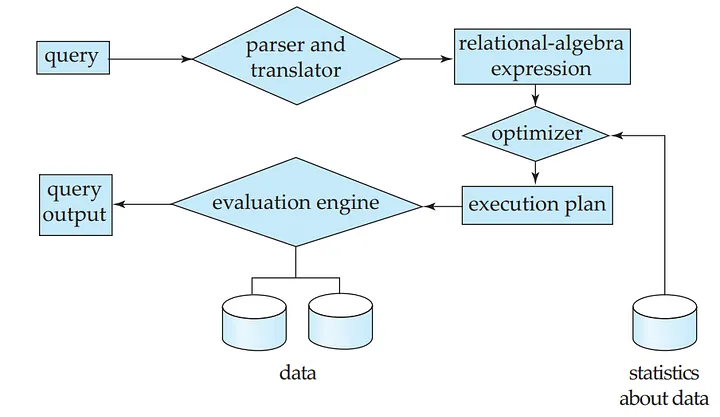
I encountered this first at a fintech where we ran nightly analytics on transaction data. The queries were read-only (no locks on user tables), yet we'd randomly see deadlock victims during report generation.
The deadlock graph showed multiple worker threads owned by the same session waiting on each other through "exchange" buffers. It made no sense until I understood what SQL Server does under the hood.
When SQL Server runs your statement in parallel, it spawns worker threads and assigns them shared "exchange" buffers to coordinate data flow. Each worker pushes rows into its buffer and pulls rows from peer workers.
If two workers wait on the same buffer, say, worker 1 needs data from worker 2's buffer, while worker 2 needs data from worker 1's buffer, you get a circular wait. The lock monitor treats these buffers like any lockable resource, registers an ExchangeEvent cycle, and picks a victim.
All of this happens entirely within the query processor, with no involvement from your actual data tables.
The frustrating part? This only triggers under specific conditions: high parallelism (MAXDOP 8+), complex queries with multiple joins or aggregations, and unlucky timing where two workers hit the same buffer simultaneously.
It might run fine 99 times and deadlock on the 100th execution with identical data.
Spotting the pattern
You'll know this is happening when blocking graphs include nodes labeled ExchangeEvent, and you see high CXPACKET or EXCHANGE waits in sys.dm_os_waiting_tasks. The deadlock XML will show process nodes with no object_id or associated_object_id because no tables are involved; it's just internal coordination structures.
SQL Server's lock monitor wakes every 100 milliseconds after recent incidents, automatically captures these problems, and surfaces them through Extended Events. You can see the full worker thread graph, including which exchange operators are involved and what data they're coordinating.
The quick fix
The fastest fix is to remove the parallelism that creates the contention.
SELECT customer_id, SUM(total_amount)
FROM orders
WHERE order_date >= '2024-01-01'
GROUP BY customer_id
OPTION (MAXDOP 1);  -- Force serial execution
I know, I know, this feels like defeat. You spent time tuning for parallelism, and now you're deactivating it. But a slow query that completes is infinitely better than a parallel query that deadlocks. And in many cases, the serial plan runs faster anyway once you account for coordination overhead.
You can also set a database-wide cap with ALTER DATABASE SCOPED CONFIGURATION SET MAXDOP = 4, which prevents any query from going above 4-way parallelism. Or, in emergencies, drop the server-level MAXDOP to 1 until you can properly tune the problematic queries.
The permanent fix
Long-term, the solution is to give each worker less work so they don't need as much buffer coordination. Create covering indexes that turn table scans into seeks — this dramatically reduces the row volume flowing through exchange buffers.
Keep statistics current so the optimizer prefers narrower plans instead of brute-force parallelism. And size your worker-thread pool for peak concurrency using sp_configure.
I've also found that breaking complex queries into simpler pieces helps. Instead of one massive query with five joins and three aggregations running in parallel, split it into temp-table stages, with each stage running serially or with limited parallelism. Yes, it's more code. Yes, it uses tempdb.
But it never deadlocks on exchange buffers, and it's way easier to debug when something goes wrong.
The nuclear option: rethink whether you need that level of parallelism at all. I've seen teams throw hardware at problems that could be solved with better indexing and query design. Parallelism is powerful but dangerous.
Sometimes a simple hammer (serial execution with good indexes) works better than a chainsaw (8-way parallelism with coordination overhead).
The hardest deadlocks to fix aren't the ones with complex technical solutions — they're the ones requiring organizational change. But once you fix them? The 3 AM pages stop.
Start with the pattern that's hurting you most. Fix that one correctly. Then move to the next. Progress, not perfection. Your future self will thank you when the next potential deadlock resolves itself before it becomes an incident.
Contribute to AGI development at DataAnnotation
The systems thinking that helps you build production systems is the same thinking that shapes frontier AI models. At DataAnnotation, we operate one of the world's largest AI training marketplaces, connecting exceptional thinkers with the critical work of teaching models to reason rather than memorize.
If your background includes technical expertise, domain knowledge, or the critical thinking to evaluate complex trade-offs, AI training at DataAnnotation positions you at the frontier of AGI development.
Our coding projects start at $40+ per hour, with compensation reflecting the judgment required. Your evaluation judgments on code quality, algorithmic elegance, and edge case handling directly influence whether training runs advance model reasoning or optimize for the wrong objectives.
Over 100,000 remote workers have contributed to this infrastructure.
If you want in, getting from interested to earning takes five straightforward steps:
- Visit the DataAnnotation application page and click "Apply"
- Fill out the brief form with your background and availability
- Complete the Starter Assessment, which tests your critical thinking and coding skills
- Check your inbox for the approval decision (typically within a few days)
- Log in to your dashboard, choose your first project, and start earning
No signup fees. DataAnnotation stays selective to maintain quality standards. You can only take the Starter Assessment once, so read the instructions carefully and review before submitting.
Apply to DataAnnotation if you understand why quality beats volume in advancing frontier AI — and you have the expertise to contribute.
.jpeg)