
Everything you've been taught about asyncio making code faster needs revisiting. For instance, adding async def and await doesn't automatically improve performance. In fact, I’ve seen improper implementations degrade p90 latency from under 1 second to over 2 seconds, with some requests timing out entirely.
The reality is that asyncio's learning curve hides critical lessons about event-loop management that you only learn through production failures.
In this guide, I distill some battle-tested practices that separate educational examples from production-ready systems. You'll learn exactly when asyncio fits your workload, how to keep the event loop responsive under load, and how to ship resilient async code that delivers on the performance promises.
1. Decide whether asyncio is the right tool (most teams get this wrong)
The first mistake can happen before you write any code: adopting asyncio without understanding your actual bottleneck. I've watched teams spend quarters rewriting excellent synchronous code to async, only to discover their real problem was an unindexed database query or an N+1 pattern. The async rewrite made debugging harder while solving nothing.
Here's what makes this decision treacherous: once you introduce async into your codebase, it spreads like a virus. One async function forces its caller to become async, which forces its caller to become async, and soon you've infected your entire call stack.
Async experience
From my experience, that architectural debt only pays off under very specific conditions.
A team once converted their Django monolith to an async architecture. They started with one view that fetched data from three microservices. Made that async, great. But then, the auth middleware needed to be async.
Then, the logging system.
Then, the ORM had to switch to async drivers.
Months later, they'd rewritten 40% of their codebase, introduced dozens of subtle race conditions, and their actual performance improvement? About 15%. They could have achieved the same gain by adding a Redis cache in a week.
The decision framework
Use asyncio for I/O-bound, high-latency, high fan-out tasks. That means HTTP calls to remote APIs, message queue consumers, or handling thousands of concurrent WebSocket connections. The work happens outside your Python process while the event loop manages other tasks. Perfect use case.
Skip asyncio for CPU-bound or disk-intensive workloads. The Global Interpreter Lock (GIL) still serializes computation, so you gain nothing. Database-heavy applications won't improve either, as each query still blocks on server-side execution limits, regardless of async wrappers.
I've profiled this extensively: the overhead of managing the event loop often costs more than you gain from concurrent I/O when you're database-bound.
The test you should run
Start with proof, not intuition. Before converting anything, benchmark both the synchronous and async implementations under identical concurrency levels. Track throughput and p99 latency, not just "does it feel faster."
I once ran this test before a significant async migration. We built a proof-of-concept that handled 100 concurrent requests with both approaches. The synchronous version with proper connection pooling delivered 950 req/sec at p99 latency of 120ms.
The async version? 1100 req/sec at p99 of 140ms. Better, but not 6-months-of-engineering better. We cancelled the migration and spent that time on actual bottlenecks instead.
I’d also advise that you keep a rollback branch ready. I've done three async migrations, and two of them got rolled back after production monitoring showed regressions we didn't catch in load testing. The ability to revert quickly saved us from extended incidents both times.
The uncomfortable truth: for most CRUD applications behind a database, asyncio adds complexity without meaningful performance gains. Reserve it for the 20% of workloads where it actually matters.
2. Keep the event loop non-blocking (or watch everything freeze)
This is the pattern that kills more async applications than any other. Your event loop can only switch tasks when the current one yields control. A single synchronous operation, whether it's a CPU-intensive calculation, a file read, or someone's stray requests.get() call freezes the entire loop and starves all other coroutines.
I debugged an incident once in which our p90 and p95 metrics tripled overnight with no code changes. Took me three hours to find it: someone had added JSON parsing to every response body. Seems innocent, right?
But we were processing 50KB responses, and Python's json.loads() is pure CPU work that holds the GIL. With 100 concurrent requests, 99 of them sat idle waiting for that one blocking parse to finish.
We dropped 20% of requests due to timeouts because the event loop couldn't process health checks while blocked on JSON parsing. The web server thought the application was dead and stopped routing traffic.
All because of one synchronous library call in an async context.
The operations that impact performance
Common blocking operations that you need to hunt down and eliminate:
- Tight computational loops without yield points
- Standard file I/O (open, read, write all block)
- Synchronous HTTP libraries like Requests
- Database drivers that weren't built for asyncio
Each one turns your theoretically concurrent system into a serial bottleneck.
The worst part? These issues don't always show up in development. Your dev environment has a light load, so the blocking operations finish quickly. Your production can have 100x the traffic, and suddenly those milliseconds of blocking become seconds of stalled requests.
The fixes that work
Move CPU-bound work off the event loop using asyncio.to_thread() for Python 3.9+ or loop.run_in_executor() with a ThreadPoolExecutor for older versions.
For more intensive computational work, use ProcessPoolExecutor for true parallelism.
Replace synchronous I/O libraries with awaitable clients, such as httpx.AsyncClient or asyncpg.
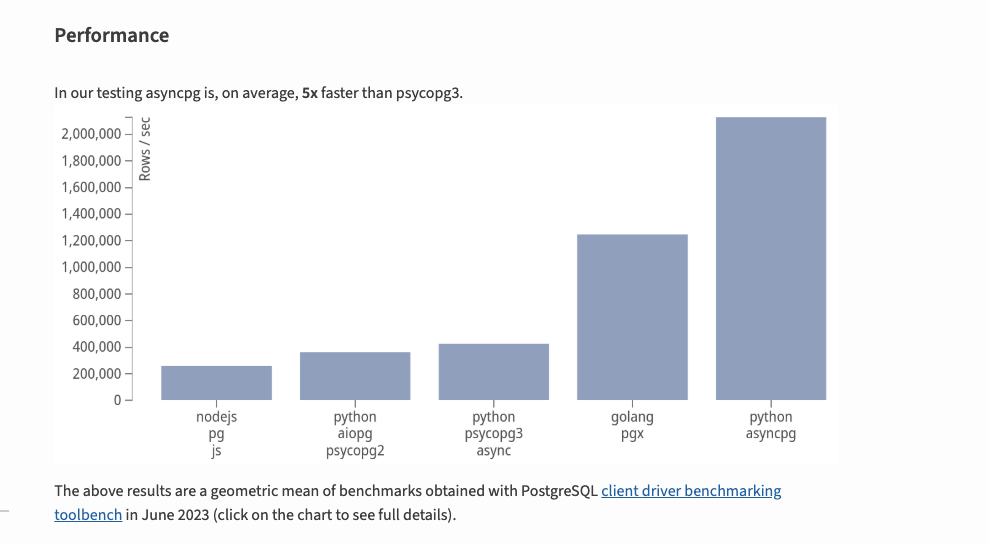
These libraries release control back to the event loop during network operations, which is the entire point of async.
When debugging mysterious slowdowns, enable loop.set_debug(True) and set asyncio's log level to logging.DEBUG. This surfaces callbacks that exceed your threshold and tells you exactly which operation is blocking.
I've also used a temporary fix that saved production during an incident: add await asyncio.sleep(0) to long-running loops to yield control voluntarily. It's a hack that lets you ship a hotfix while you properly refactor the blocking code. Not proud of it, but it kept us online while we fixed the root cause.
The pattern I follow now: audit every third-party library before using it in async code. Check the docs for explicit async support. Test it under load. Assume it blocks unless proven otherwise. This paranoia has saved me countless hours of debugging.
3. Orchestrate concurrency with tasks and TaskGroups (or lose track of everything)
Launching tasks without tracking them can lead to silent failures that can come back to haunt you. The event loop may garbage-collect unclaimed coroutines, swallow their exceptions, or allow parent functions to complete while child tasks are still running.
Here's how it happens: you create a task to send an analytics event in the background. The main request completes and returns. The analytics task is still running, but no one is waiting for it.
If it raises an exception, that exception vanishes into the event loop.
If Future.set_exception() is called but the Future is never awaited, the exception never propagates. You think you're sending analytics, but you're actually sending nothing, and your logs show zero errors.
This gets worse when you assume execution order. I once had a data pipeline where Task A wrote to a temp file, and Task B read from it. Worked perfectly in testing. In production, Task B sometimes ran first and crashed because the file didn't exist yet.
Async code can resume in any sequence, creating race conditions that corrupt data or leak resources.
The solution: structured concurrency
The fix is structured concurrency. Keep every task's handle and use Python's TaskGroup when available (Python 3.11+). TaskGroup guarantees that if any child task raises an exception, it bubbles up to the parent context and all sibling tasks are automatically cancelled. Nothing fails silently.
For pre-3.11 codebases, capture the object returned by asyncio.create_task() and await it explicitly, even in error paths. I keep a code review checklist item: "Every create_task() call must have a corresponding await or exception handler."
Wrap operations that must outlive their parent context in asyncio.shield(), and cap unbounded gather() calls with a semaphore to prevent overwhelming the loop. I learned this after a gather() call spawned 50,000 tasks simultaneously, exhausting file descriptors. The semaphore pattern throttles task creation to a manageable level.
The simple rule that's saved me countless bugs: create a task, track its handle, and always await it. If you can't await it immediately, store it in a set and await the set during cleanup. No orphaned tasks, no silent failures, no mystery bugs months later.
4. Depend on awaitable, non-blocking libraries (the compatibility trap)
Your async application moves at the speed of its slowest call. I learned this the hard way when we migrated to FastAPI, but kept using psycopg2 as our database driver. Every query blocked the event loop.
Every other coroutine sat idle waiting. Our "high-performance async API" was actually slower than the synchronous Flask version because we'd added event loop overhead without gaining any concurrency.
When a synchronous library blocks on a long-running operation, every other coroutine freezes. Timeouts cascade across your service. Your monitoring shows high CPU usage but low throughput, which makes no sense until you realize the CPU is busy context-switching between threads that are all blocked on the same synchronous operation.
The fix requires discipline: only use libraries that explicitly support async and release control back to the event loop. This isn't about "async-friendly" marketing claims, I've been burned by those.
This is about verifying that the library actually implements the async/await protocol and yields during I/O.
The migration map
For everyday integrations, trade synchronous counterparts for proper async versions:
- Replace Requests with httpx.AsyncClient
- Swap psycopg2 for asyncpg or aiopg
- Move from redis to aioredis
- Trade pymongo for motor
- Use aiofiles for file operations or offload them to a thread executor
Each swap requires testing. I've seen async libraries that claim to be non-blocking but still do synchronous I/O under the hood. The only way to know is by profiling under load. If your event loop stalls during a library call, that library is lying about being async.
SQLAlchemy introduced official (non-beta) asyncio support in 2.0 (January 2023), though the asyncio extension was first added in beta form in version 1.4, which tells you how slowly the ecosystem adapts. Even major, well-funded libraries lag behind async adoption. Treat any "async support" claim with suspicion until you've verified the implementation.
When you're stuck with legacy code
Business deadlines sometimes prevent a complete migration. When you can't replace a synchronous library immediately, wrap legacy calls in an executor so they run in a background thread instead of blocking the loop. This isn't ideal (thread overhead still exists), but it's better than freezing your entire event loop.
The pattern I use: identify the top 5 most frequently called synchronous operations, measure their impact on the event loop, and prioritize replacing the worst offenders. You don't need to migrate everything at once. Just fix the operations that appear in every hot path.
A single synchronous database call on a critical path can undermine performance gains from your entire async infrastructure. I've seen systems where 95% of code was properly async, but that remaining 5% of blocking operations created a ceiling that no amount of tuning could break through.
5. Handle exceptions and cancellations explicitly (or debug ghosts)
Awaited coroutines surface their exceptions immediately, but background tasks, improperly configured gather() calls, and cancelled operations fail silently. This creates ghost bugs — errors that happen but leave no trace in your logs, making them nearly impossible to debug.
I spent a week once chasing a bug where user notifications randomly stopped sending. No errors in logs. No exceptions in monitoring. The function just... didn't run sometimes. Eventually, we discovered we were creating background tasks for notifications but never awaiting them.
When the request completed, those tasks were garbage-collected. Suppose the notification succeeded before garbage collection, great. If not, it vanished silently.
CancelledError creates another trap. It looks like a regular exception, so developers instinctively catch it in broad exception handlers. But swallowing CancelledError prevents the event loop from reclaiming resources.
Almost all asyncio objects are not thread safe, and ignoring cancellation breaks the cleanup chain, leaving half-open sockets and database connections consuming system resources indefinitely.
The structured concurrency solution
In Python 3.11+, asyncio.TaskGroup automatically handles most of this complexity. Any child task exception immediately cancels siblings and re-raises the first error to the parent context. You get deterministic error handling without manual tracking.
For standalone background work that must outlive the current context, attach a callback to surface exceptions. I keep a helper function that logs any exceptions from a background task to our error-tracking service. Without this, those exceptions disappear into the void.
Structure cleanup code in finally blocks and always re-raise CancelledError. This pattern keeps exceptions visible, lets cancellations work correctly, and prevents resource leaks. I add this to every code review: "Does this coroutine handle CancelledError properly?"
The pattern that's never failed me: treat cancellation as a first-class concern, not an edge case. Test it explicitly. Force-cancel your coroutines and verify that cleanup happens. Make cancellation paths as robust as success paths.
6. Profile, benchmark, and tune (gut feelings lie)
Well-written async code can still crawl when hidden bottlenecks lurk in the event loop. I've debugged systems where the code looked perfect (proper async libraries, structured concurrency, no obvious blocking), yet throughput was awful.
The problem?
We were creating 10,000 tasks on startup, and the event loop scheduler couldn't keep up with that volume of context switches.
You need proof, not intuition, before declaring your implementation fast. Start by putting the loop itself under a microscope with loop.set_debug(True). This logs the execution time of I/O selectors and warns when operations exceed your threshold. It's noisy but catches the obvious mistakes.
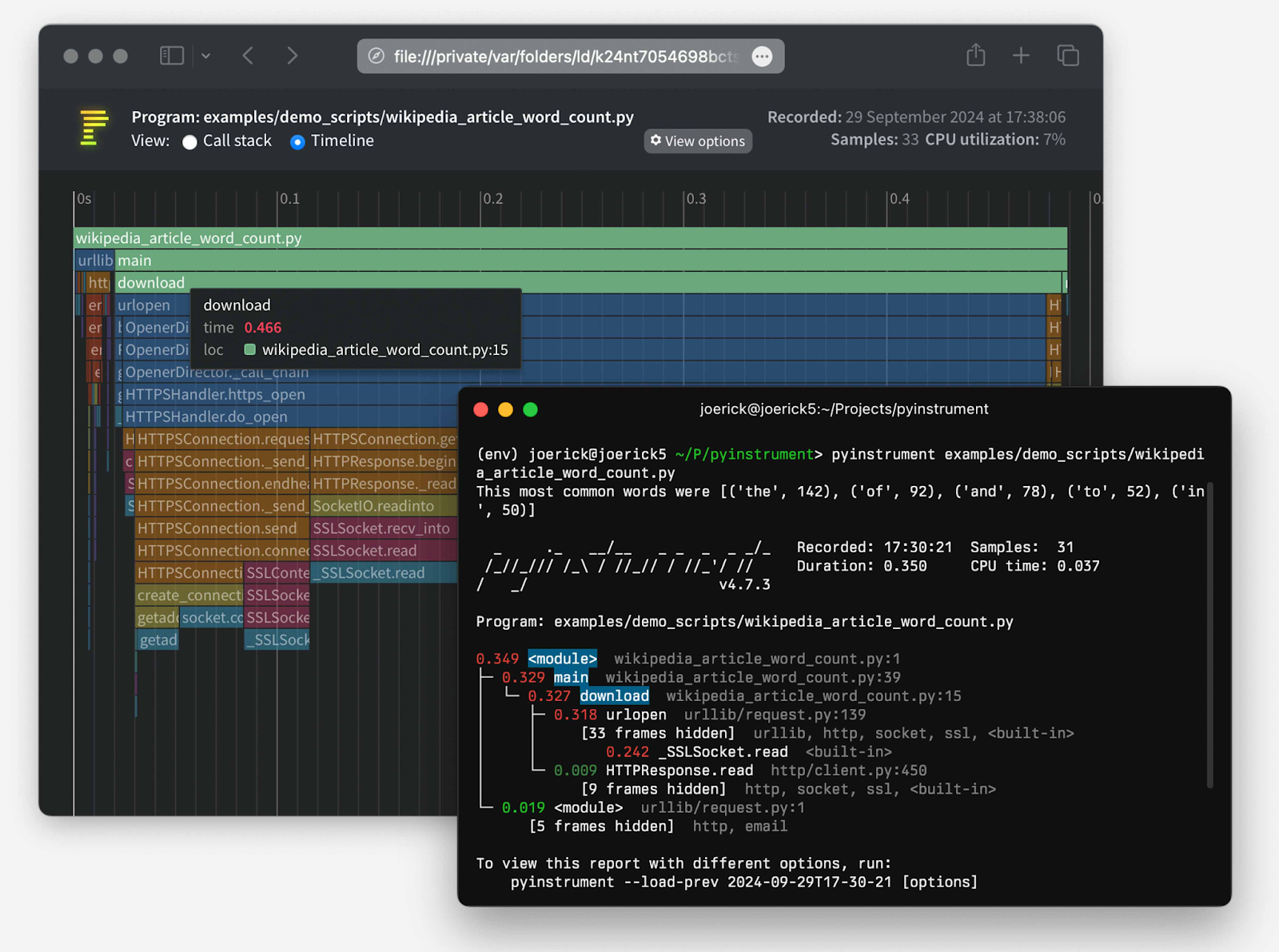
For deeper analysis, capture a flame graph with async awareness. The standard profilers don't understand awaits; they show time in the scheduler, not time waiting on I/O.
Use the async-aware version of pyinstrument to track time spent before and after every await, revealing whether you're blocking on CPU work or genuinely waiting on I/O.
The metrics that matter
For production systems, I track three numbers religiously:
- Throughput (requests/sec)
- Task backlog (how many tasks are queued)
- Database driver wait time
When the backlog grows while the throughput stays flat, you've hit a bottleneck. When the database wait time is zero, but the throughput is low, your application logic is the problem, not I/O.
Tools like aiomonitor let you debug running event loops in production, which has saved me during live incidents.
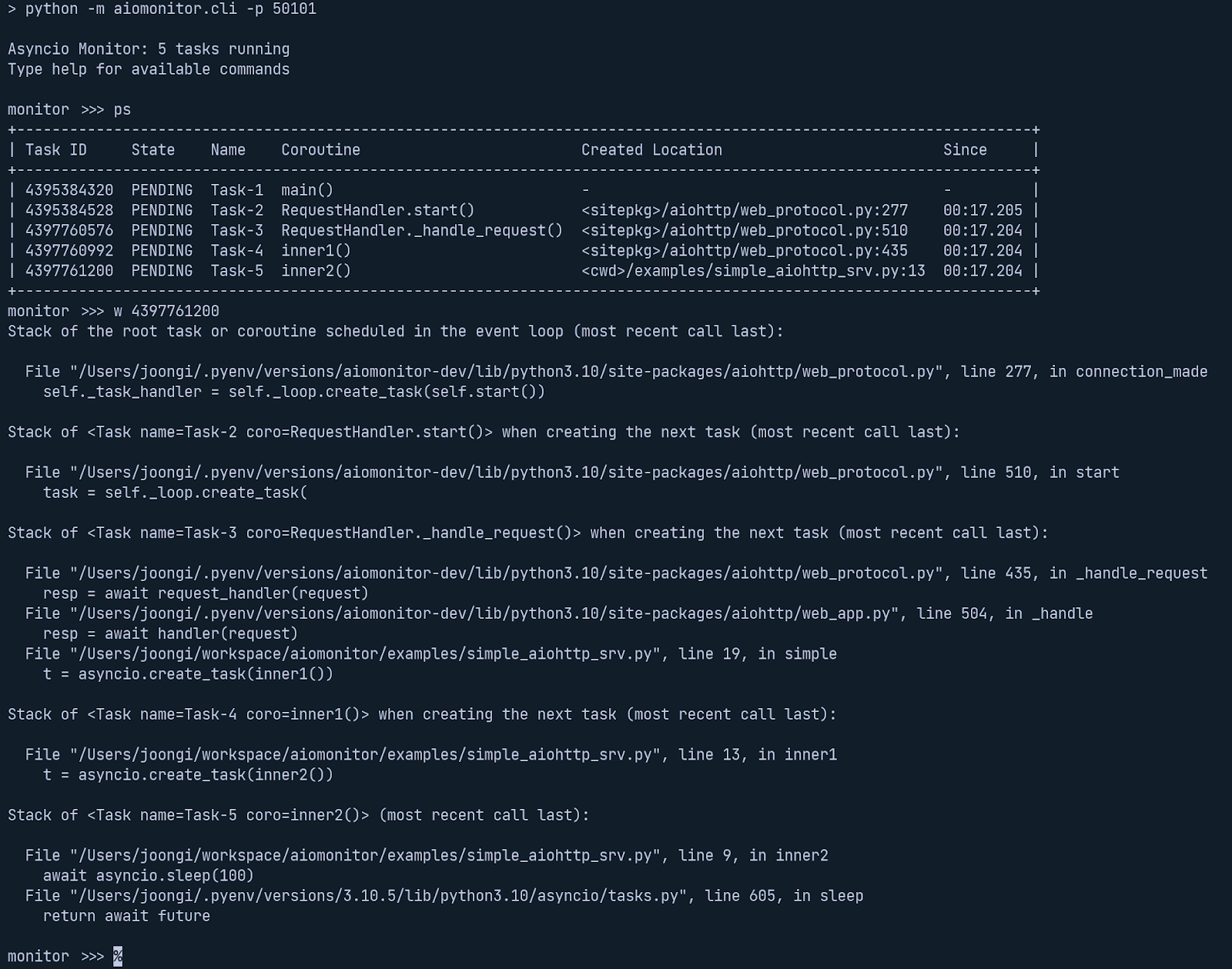
You can inspect the task queue, see which coroutines are stuck, and identify blocking operations without redeploying.
You can also load-test with tools like Locust to see whether the p99 latency holds steady as thousands of tasks pile up.
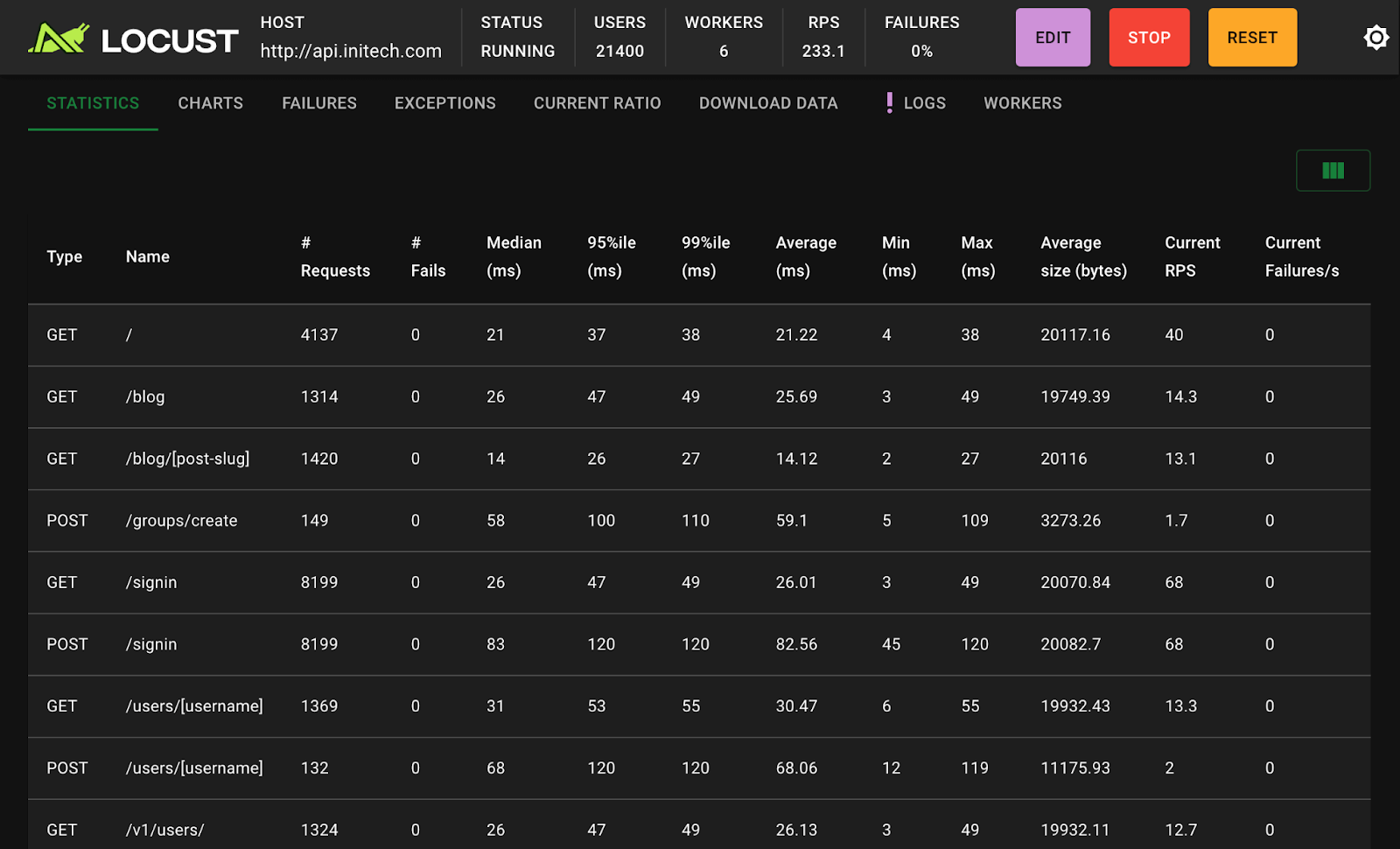
I typically ramp from 10 to 10,000 concurrent users over 5 minutes and watch where things break. The failure mode tells you what to optimize.
When profiling shows a fix works, rerun the benchmark to confirm. I've shipped "optimizations" that made things worse because I trusted my intuition instead of measurements. Only measured speed counts. Everything else is speculation that wastes engineering time.
The discipline I follow: benchmark before and after every performance change, keep the results in git, and reject any PR that claims performance improvements without proof. Data beats opinions every time.
7. Write deterministic async tests (flaky tests are production bugs)
Flaky async tests have the exact root cause as flaky production code: you're depending on timing rather than state. I've reviewed hundreds of async test suites, and they all share the same pathology — tests that pass 95% of the time and fail mysteriously in CI.
The failures are always race conditions that exist in production too, but haven't manifested under load yet.
Because coroutine scheduling is non-deterministic, two awaits written in sequence can finish in either order. This creates race conditions that pass locally (where the fast path wins) but fail unpredictably in CI (where the slow path sometimes wins first).
The worst part? These failures teach your team to ignore test failures, which is how real bugs end up in production.
The mistakes that create flakes
The first mistake is using time.sleep() to "wait" for async work. That call blocks the event loop, so nothing you're waiting for can actually run. I've seen test suites with sleep(5) calls scattered everywhere, slowing tests to a crawl while still being flaky because five seconds isn't always enough.
Another silent failure comes from fire-and-forget tasks.
If your test exits while background coroutines are pending, those tasks are garbage-collected, and their exceptions are lost. The test passes even though your background work failed. Later, that same pattern causes production incidents that are hell to debug because the errors never surface.
The discipline that fixes it
Replace time-based waits with explicit state checks. Instead of "wait one second and hope the data arrived," poll the state until the desired condition is true or timeout. This makes tests deterministic. They pass when the state is correct, regardless of timing.
I keep a fixture that audits the event loop after every test, cancelling any pending tasks and asserting that none leaked. If anything survives cleanup, the test fails and forces explicit resource management. Enable debug mode during tests to get tracebacks showing where leaked tasks were created.
Remember to treat cancellation as a first-class test path. Force-cancel your long-running coroutine and assert it raises asyncio.CancelledError, then confirm resources are released. I've found more bugs testing cancellation paths than testing happy paths.
The pattern I enforce in code reviews: no sleeps in tests, no fire-and-forget tasks, explicit cleanup after every test, and cancellation tested for every long-running operation. These rules eliminate 90% of flaky tests.
With these safeguards, your tests stay fast, repeatable, and free of heisenbugs. When a test fails, it's a real bug, not a timing issue. That trust in your test suite is essential for shipping async code confidently.
8. Implement graceful shutdown hooks (or leak everything on exit)
When your async service receives SIGTERM on Kubernetes, or you hit Ctrl-C during local testing, the event loop stops immediately unless you intercept the signal. Exit without cleanup, and in-flight requests vanish, database connections remain open, and the loop itself leaks file descriptors.
I've debugged production issues where pods restarted cleanly but left zombie connections in the database connection pool. Eventually, the pool was exhausted, and new pods couldn't get connections.
The application looked healthy (green checks everywhere), but couldn't serve requests because a dead process held all the connection slots.
The 5-step shutdown sequence
A robust shutdown handles these steps in order:
- Trap termination signals so you can run cleanup
- Stop accepting new work immediately
- Allow a grace period for existing coroutines to finish
- Cancel remaining pending tasks with a timeout
- Close connection pools and the event loop itself
This sequence matters because each step depends on the previous one. If you cancel tasks before they finish naturally, you might lose in-flight work.
If you don't set a timeout, a single stuck coroutine can prevent shutdown indefinitely.
The grace period is critical in production. I typically use 10-30 seconds, depending on the typical request duration. Kubernetes gives you 30 seconds before force-killing the pod, so your grace period needs to fit within that window, leaving time for cleanup.
The implementation details that matter
The signal handler must return quickly, so you can't do blocking cleanup in the handler itself. Instead, set an event or flag that your main loop checks. For signals, the event loop must run in the main thread, and you must close any loops you created manually.
Common mistakes include calling blocking cleanup code inside the signal handler, waiting forever on stubborn resources without a timeout, or registering handlers from a worker thread. The add_signal_handler method is safe only in the main thread and is Unix-only. Windows requires signal.signal() instead, which has different semantics.
I keep a shutdown checklist that I review for every async service:
- Does it trap SIGTERM?
- Does it stop accepting new requests?
- Does it have a grace period?
- Does it cancel pending work?
- Does it close all connection pools?
Each item is non-negotiable for production deployments.
The pattern that's saved me in production: log every step of shutdown verbosely. When a pod fails to terminate cleanly, those logs tell you exactly where it got stuck. I've debugged dozens of shutdown hangs using these breadcrumbs.
Contribute to AGI development at DataAnnotation
The systems thinking that helps you debug async deadlocks is the same thinking that shapes frontier AI models. At DataAnnotation, we operate one of the world's largest AI training marketplaces, connecting exceptional thinkers with the critical work of teaching models to reason rather than memorize.
If your background includes technical expertise, domain knowledge, or the critical thinking to evaluate complex trade-offs, AI training at DataAnnotation positions you at the frontier of AGI development.
Our coding projects start at $40+ per hour, with compensation reflecting the judgment required. Your evaluation judgments on code quality, algorithmic elegance, and edge case handling directly influence whether training runs advance model reasoning or optimize for the wrong objectives.
Over 100,000 remote workers have contributed to this infrastructure.
If you want in, getting from interested to earning takes five straightforward steps:
- Visit the DataAnnotation application page and click "Apply"
- Fill out the brief form with your background and availability
- Complete the Starter Assessment, which tests your critical thinking and coding skills
- Check your inbox for the approval decision (typically within a few days)
- Log in to your dashboard, choose your first project, and start earning
No signup fees. DataAnnotation stays selective to maintain quality standards. You can only take the Starter Assessment once, so read the instructions carefully and review before submitting.
Apply to DataAnnotation if you understand why quality beats volume in advancing frontier AI — and you have the expertise to contribute.
.jpeg)