
AI code review tools are now standard in most engineering organizations. 84% of developers use or plan to use AI tools in their workflow. This leads to a consistency in catching bugs faster, freeing up senior engineers for architecture work, and shipping cleaner code.
The data shows this can work. When teams report considerable productivity gains from AI tools, 70% also report better code quality. Teams using AI report quality improvements of 81%, compared to 55% for teams that are equally fast but without automated review. Even without increased delivery speed, AI review doubles quality gains. Teams using AI review see 36% quality improvements compared to 17% for teams moving at the same pace without it.
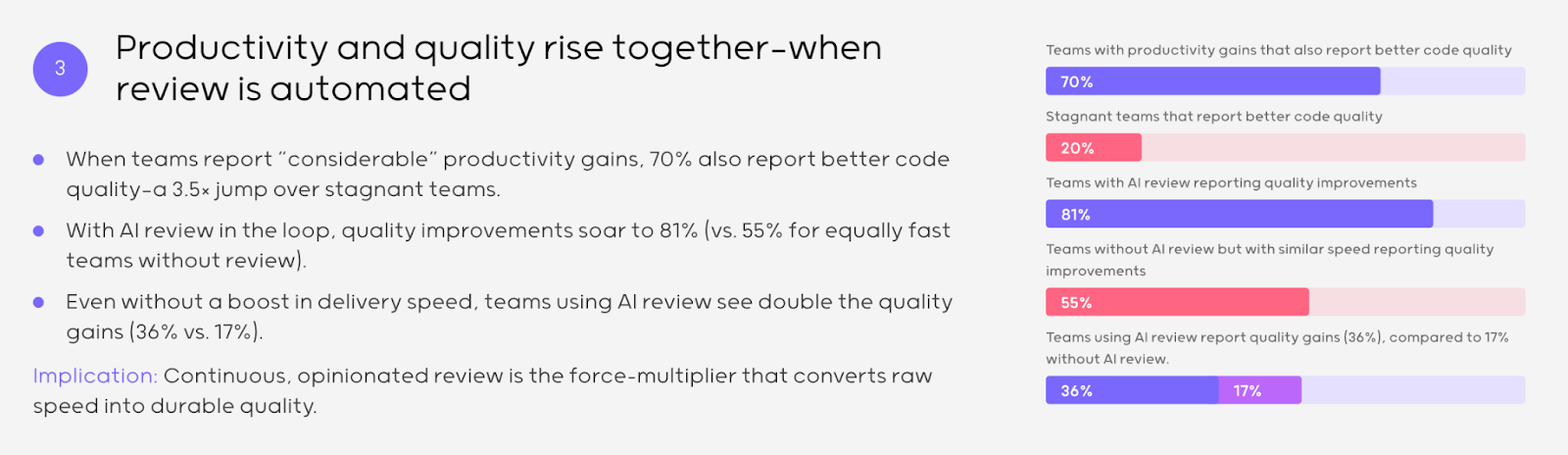
The pattern demonstrates that continuous, opinionated review converts raw speed into durable quality. AI code generation accelerates output. AI code review catches what manual review misses at scale.
But this also creates a new problem. The tools generate feedback. They don't generate the judgment required to distinguish signal from noise. AI review flags several potential issues per pull request. Some are critical. Most are stylistic preferences or false positives. Someone has to make that distinction.
We operate an evaluation infrastructure at DataAnnotation, where expert developers assess AI-generated code for labs building frontier models. After routing millions of code evaluations, we've seen where AI review actually improves quality and where it shifts the bottleneck from code generation to human judgment at scale.
This article examines best practices for AI code review and integration.
Practice 1: Define the role of AI versus humans
AI excels at catching what can be formally specified: style guide violations, known vulnerability patterns like SQL injection or hardcoded secrets, obvious performance antipatterns like N+1 queries, and syntax errors. These checks benefit from consistency across thousands of PRs and don't require understanding why the code exists.
Humans handle what requires judgment: Does this architectural decision make sense given our scaling requirements? Does this business logic correctly handle the edge cases our customers actually hit? Will the team maintaining this code in six months understand why these decisions were made?
For example, AI can catch that a function lacks input validation. But only a human reviewer can assess whether the validation logic correctly addresses the actual threat model. AI flags that a database query could be optimized. But only a human reviewer knows that this query runs once per day in a batch job where latency doesn't matter, and optimizing it would add complexity that isn't worth the maintenance burden.
Implementation: Configure your CI pipeline so AI review runs automatically on every PR and blocks merge for critical security findings (hardcoded credentials, SQL injection, XSS vulnerabilities, authentication bypasses). Require human approval for all merges regardless of AI status. Route PRs touching authentication, payments, or data deletion to senior reviewers automatically using CODEOWNERS files.
Practice 2: Establish and document context boundaries
Most AI code review tools analyze diffs in isolation. They see what changed in this PR, not why it changed or how it interacts with the rest of your system. This context collapse causes predictable blind spots.
Consider a regex change in a utility function. The diff looks harmless, like just a pattern update. But that utility is called by your authentication flow, your API routing, and your data validation layer. A subtle change in matching behavior could break login for some users with certain email formats. The AI tool sees valid regex syntax. It doesn't see the downstream dependencies.
Or consider a schema migration that adds a nullable column. AI sees valid SQL. It doesn't know that your analytics pipeline assumes that column exists and will break when it encounters nulls, or that your mobile app caches the old schema and won't request the new field for 30 days until users update.
Implementation: Create a one-page document listing exactly what your AI tools can and cannot see. Share it in your engineering wiki. For example: "Our AI review tool analyzes single-repo diffs. It cannot see cross-service dependencies, ticket requirements, runtime configuration, or database state. Changes to shared libraries, API contracts, or database schemas require senior review regardless of AI findings."
Practice 3: Validate business context, not just code patterns
The most expensive bugs aren't syntax errors or style violations. They're features that work correctly according to the code but incorrectly according to the business requirement. The code compiles, tests pass, AI review approves, the PR merges, the feature ships, and then someone notices it doesn't do what customers actually needed.
AI tools evaluate code against patterns. They cannot read your Jira ticket and verify that the implementation matches the acceptance criteria. They cannot know that "handle empty input gracefully" means "show a helpful error message" rather than "silently return null." They cannot assess whether your discount calculation handles the edge case where a customer has both a coupon code and a loyalty discount, and the business rule says they shouldn't stack.
Implementation: Require every PR to link to its ticket (no ticket, no merge). Add a mandatory checklist item: "Does this PR address all acceptance criteria in the linked ticket?" Train reviewers to open the ticket before opening the diff. Flag scope creep. If the PR includes changes not mentioned in the ticket, question whether they belong or need their own ticket with proper requirements review.
Practice 4: Tune for signal, not coverage
Default configurations optimize for catching everything possible. Vendors do this because missing a real issue is worse PR than generating false positives. But for your team, excessive false positives create alert fatigue that's worse than missing some issues, because developers stop reading AI feedback entirely.
When developers receive 40 comments per PR, most addressing theoretical concerns or style preferences that don't match your team's actual standards, they develop dismissal habits. They click "resolve" without reading. When a critical security issue does appear in that wall of noise, it gets dismissed alongside the cosmetic ones.
The counterintuitive insight: a tool that flags five critical issues per PR produces better security outcomes than one that flags fifty issues of varying importance, because developers actually read and act on the five.
Implementation: Track acceptance rates by rule category for one month. If a rule gets dismissed more than 30% of the time, investigate: either it generates false positives in your codebase, or developers need training on why it matters. Disable rules that don't match your actual standards. Create project-specific configurations; your authentication service has different risk profiles than your internal admin dashboard. Review and retire noisy rules monthly.
Practice 5: Keep PR scope focused
AI-assisted development produces larger PRs because developers generate more code faster. A developer who previously wrote 200 lines per day might now produce 600. But reviewer capacity didn't triple. And the research is clear. The defect detection drops sharply once PRs exceed 200-400 lines.
The mechanism is cognitive load. Reviewing code requires holding a mental model of the system, then evaluating changes against that model. Small PRs let reviewers load context once and apply it. Large PRs force constant context-switching by line 800; reviewers have forgotten what they saw at line 200. They start skimming. They miss critical issues.
Implementation: Configure your CI pipeline to flag PRs exceeding 400 lines (Danger or custom GitHub Actions work well). Separate refactoring from features; refactoring changes many files, but shouldn't change behavior, so it's easier to review in isolation. Use stacked PRs for large features: break work into dependent PRs that build on each other, review and merge incrementally. Exclude generated files (migrations, lock files, compiled assets) from line counts.
Practice 6: Leverage metrics to focus human effort
Without measurement, you can't distinguish between tools that help and implementations that waste time. But the obvious metrics are misleading. "Issues found per PR" incentivizes noise. "Review turnaround time" incentivizes shallow analysis.
Metrics that actually predict code quality:
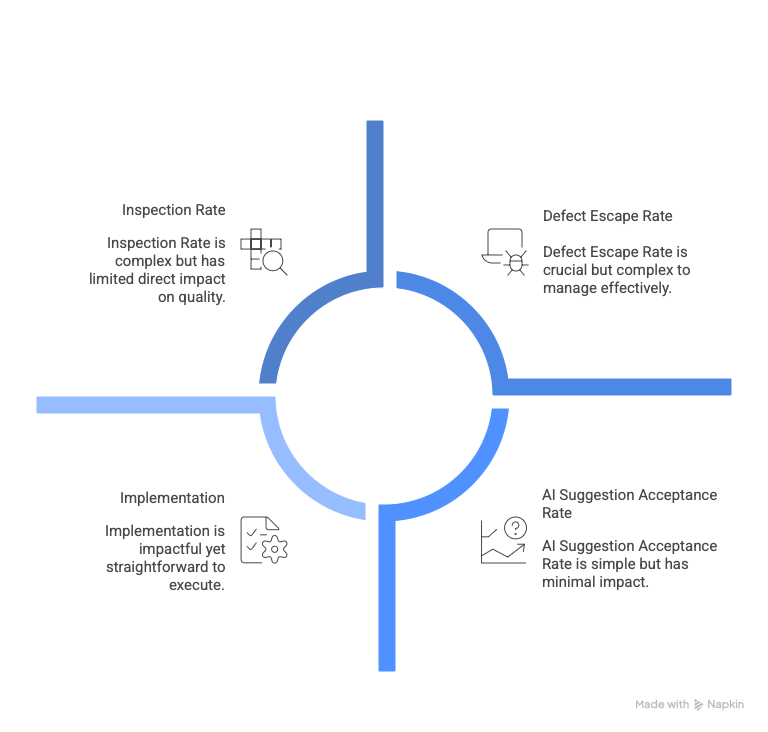
- Defect escape rate: How many bugs reach production despite review? This is the metric that matters most. Track by severity because catching more low-severity issues while missing the same high-severity ones isn't progress.
- Inspection rate: Lines of code reviewed per hour. If significantly below 150-500 LOC/hour, either the change set is huge or the code is especially complex. In those cases, help the author break down logic into smaller, well-named units rather than speeding up reviews.
- AI suggestion acceptance rate by category: Which suggestions do developers actually apply versus dismiss? Low acceptance rates signal noise. Use this to identify which specific checks add value in your codebase and which generate false positives.
- Implementation: Establish baselines before changing your process. Run two weeks of measurement with your current workflow. Deploy AI review to a subset of repositories first and compare defect escape rates. Review metrics monthly; if they're not improving, tune your configuration rather than waiting longer.
Practice 7: Integrate into existing workflow
Feedback that requires context-switching gets ignored. A developer who finishes a PR and moves to the next task isn't going to check a separate dashboard to see what AI thought about their previous work. The context is gone. The feedback is useless.
Integration points that work
GitHub Actions/GitLab CI with inline PR comments; results appear as check status and inline comments, so developers see feedback before requesting human review. IDE plugins (VS Code, JetBrains) for real-time suggestions as developers write code; issues get fixed before commit, reducing PR iteration cycles entirely. PR blocking for genuinely critical findings only (hardcoded secrets, SQL injection, authentication bypasses).
Integration points that fail
Standalone dashboards get abandoned within weeks. Email reports arrive after decisions are made. Weekly summaries are too aggregated to act on. If feedback doesn't appear where developers already work, it won't influence their decisions.
Practice 8: Preserve learning channels
Code review serves two functions: quality control and knowledge transfer. Junior developers learn system architecture by reviewing senior developers' code. Senior developers stay grounded in implementation details by reviewing junior developers' work. The review discussion itself, the "why did you do it this way" conversation, transmits institutional knowledge that doesn't exist in documentation.
When AI automates too much, this learning channel disappears. The junior developer doesn't know there was something to learn; AI approved it, so it must be fine. The senior developer never articulates why a particular approach won't scale, because nobody asked. Teams with high AI adoption but low review discussion report flattening skill development, and new hires take longer to reach full productivity because they're not learning from review feedback.
The implementation requires human sign-off on architectural decisions; new dependencies, schema changes, API contracts, and service boundaries. Rotate review assignments so team members see different parts of the codebase rather than reviewing the same components repeatedly. When AI flags an issue, ask junior developers to explain why it matters before resolving it. This is to transform automated findings into teaching moments. Preserve review discussion threads as searchable institutional knowledge.
Getting started
If you're implementing or improving AI code review, start by auditing current bottlenecks. Where do PRs stall? What consumes reviewer time? Which categories of bugs escape to production most often? Understanding your specific constraints determines which AI capabilities add value versus which create new problems.
Start with hybrid mode. Add AI as a reviewer, not a gate. Compare AI findings with human review findings for two weeks before relying on AI for blocking decisions. Tune aggressively for signal; it's better to start with fewer rules and add more than to start with maximum coverage and fight alert fatigue. Measure defect escape rates, not issues found. Revisit configuration quarterly as your architecture evolves.
The data quality connection
Here's what most AI code review discussions miss: the quality of code that gets merged affects the quality of data that trains future AI systems. AI code assistants learn from existing codebases. If review processes fail to catch subtle bugs, architectural drift, or requirement mismatches, those patterns propagate into training data. The next generation of AI tools learns from flawed code, generating more flawed suggestions, creating a compounding quality problem.
This is why we invest heavily in expert human evaluation at DataAnnotation. The highest-quality AI training requires human judgment that can identify subtle correctness failures, evaluate intent alignment, and distinguish between code that technically works and code that actually solves the problem.
If you evaluate AI-generated code for model training, the patterns described here directly affect your work. Expert evaluators who understand context limitations provide a higher-value training signal. They identify code that appears correct but introduces initialization-order bugs, resource lifecycle issues, or architectural drift. They catch the gap between "compiles successfully" and "solves the customer's problem."
This is why AI training work pays expert rates: $40+/hour for coding projects at DataAnnotation. Every frontier model (powering ChatGPT, Claude, Gemini) depends on human intelligence that algorithms cannot replicate.
Contribute expert judgment to frontier AI development
If you have genuine coding expertise and want work that advances AI capabilities rather than just completing tasks, our platform offers a fundamentally different model. We're not a task marketplace. We're infrastructure for training frontier AI systems that serve millions.
To get started:
- Visit the DataAnnotation application page and click "Apply"
- Fill out the brief form with your background and availability
- Complete the Starter Assessment (about one to two hours)
- Check your inbox for the approval decision
- Log in to your dashboard, choose your first project, and start working
No signup fees. DataAnnotation stays selective to maintain quality standards. You can only take the Starter Assessment once, so prepare thoroughly.
Apply to DataAnnotation if you understand why expert human judgment drives AI capability advancement.
.jpeg)